The string is a data type in Python.
A string is a sequence of characters enclosed in quotes.
We can primarily, write a string in three ways:
- Single quoted strings : a = ‘harry’
- Double quoted strings : b = “harry”
- Triple quoted strings : c = ”’harry”’
String Slicing:
A string in Python can be sliced for getting a part of the string.
Consider the following string:
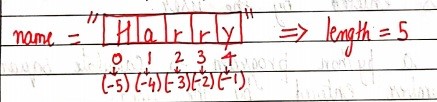
The index in a string starts from 0 to (length-1) in Python. In order to slice a string, we use the following syntax:
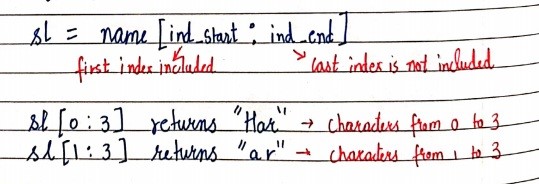
Negative Indices:
Negative indices can also be used as shown in the figure above. -1 corresponds to the (length-1) index, -2 to (length-2).
Slicing with skip value
We can provide a skip value as a part of our slice like this:
word = “amazing”
word[1:6:2] # It will return ’mzn’
Other advanced slicing techniques
word = ‘amazing’
word[:7] or word[0:7] #It will return ‘amazing’
word[0:] or word[0:7] #It will return ‘amazing’
String Functions
Some of the mostly used functions to perform operations on or manipulate strings are:
- len() function : It returns the length of the string.
len(‘harry’) #Returns 5
- endswith(“rry”) : This function tells whether the variable string ends with the string “rry” or not. If string is “harry”, it returns for “rry” since harry ends with rry.
- count(“c”) : It counts the total number of occurrences of any character.
- capitalize() : This function capitalizes the first character of a given string.
- find(word) : This function finds a word and returns the index of first occurrence of that word in the string.
- replace(oldword, newword) : This function replaces the old word with the new word in the entire string.
Escape Sequence Characters:
Sequence of characters after backslash ‘\’ [Escape Sequence Characters]
Escape Sequence Characters comprises of more than one character but represents one character when used within the string.
Examples: \n (new line), \t (tab), \’ (single quote), \\ (backslash), etc.
Chapter 3 – Practice Set
- Write a Python program to display a user-entered name followed by Good Afternoon using input() function.
- Write a program to fill in a letter template given below with name and date.
letter = ‘’’ Dear <|NAME|>,
You are selected!
<|DATE|>
- Write a program to detect double spaces in a string.
- Replace the double spaces from problem 3 with single spaces.
- Write a program to format the following letter using escape sequence characters.
letter = “Dear Harry, This Python course in nice. Thanks!!”
 beginner's