Motherboard
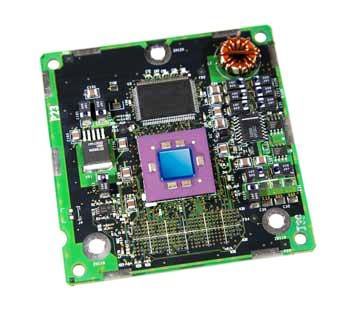
The motherboard serves as a single platform to connect all of the parts of a computer together. A motherboard connects CPU, memory, hard drives, optical drives, video card, sound card, and other ports and expansion cards directly or via cables. It can be considered as the backbone of a computer.
Features of Motherboard
A motherboard comes with following features:
- Motherboard varies greatly in supporting various types of components.
- Normally a motherboard supports a single type of CPU and few types of memories.
- Video Cards, Hard disks, Sound Cards have to be compatible with motherboard to function properly.
- Motherboards, cases and power supplies must be compatible to work properly together.
Popular Manufacturers
- Intel
- ASUS
- AOpen
- ABIT
- Biostar
- Gigabyte
- MSI
Description of Motherboard
The motherboard is mounted inside the case and is securely attached via small screws through pre-drilled holes. Motherboard contains ports to connect all of the internal components. It provides a single socket for CPU whereas for memory, normally one or more slots are available.
Motherboards provide ports to attach floppy drive, hard drive, and optical drives via ribbon cables. Motherboard carries fans and a special port designed for power supply. There is a peripheral card slot in front of the motherboard using which video cards, sound cards and other expansion cards can be connected to motherboard.
On the left side, motherboards carry a number of ports to connect monitor, printer, mouse, keyboard, speaker, and network cables. Motherboards also provide USB ports which allow compatible devices to be connected in plug-in/plug-out fashion for example, pen drive, digital cameras etc.
Computer – Ports
What is a Port?
A port:
- is a physical docking point using which an external device can be connected to the computer.
- can also be programmatic docking point through which information flows from a program to computer or over the internet.
Characteristics
A port has the following characteristics:
- External devices are connected to a computer using cables and ports.
- Ports are slots on the motherboard into which a cable of external device is plugged in.
- Examples of external devices attached via ports are mouse, keyboard, monitor, microphone, speakers etc.
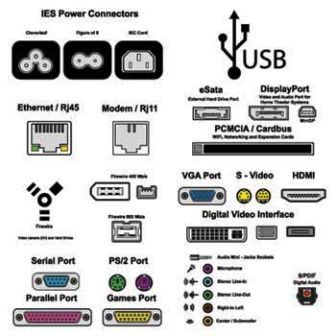
Following are few important types of ports:
Serial Port
- Used for external modems and older computer mouse
- Two versions : 9 pin, 25 pin model
- Data travels at 115 kilobits per second
Parallel Port
- Used for scanners and printers
- Also called printer port
- 25 pin model
- Also known as IEEE 1284-compliant Centronics port
PS/2 Port
- Used for old computer keyboard and mouse
- Also called mouse port
- Most of the old computers provide two PS/2 port, each for mouse and keyboard
- Also known as IEEE 1284-compliant Centronics port
Universal Serial Bus (or USB) Port
- It can connect all kinds of external USB devices such as external hard disk, printer, scanner, mouse, keyboard etc.
- It was introduced in 1997.
- Most of the computers provide two USB ports as minimum.
- Data travels at 12 megabits per seconds
- USB compliant devices can get power from a USB port
VGA Port
- Connects monitor to a computer’s video card.
- Has 15 holes.
- Similar to serial port connector but serial port connector has pins, it has holes.
Power Connector
- Three-pronged plug
- Connects to the computer’s power cable that plugs into a power bar or wall socket
Firewire Port
- Transfers large amount of data at very fast speed.
- Connects camcorders and video equipments to the computer
- Data travels at 400 to 800 megabits per seconds
- Invented by Apple
- Three variants : 4-Pin FireWire 400 connector, 6-Pin FireWire 400 connector and 9-Pin FireWire 800 connector
Modem Port
- Connects a PC’s modem to the telephone network
Ethernet Port
- Connects to a network and high speed Internet.
- Connect network cable to a computer.
- This port resides on an Ethernet Card.
- Data travels at 10 megabits to 1000 megabits per seconds depending upon the network bandwidth.
Game Port
- Connect a joystick to a PC
- Now replaced by USB.
Digital Video Interface, DVI port
- Connects Flat panel LCD monitor to the computer’s high end video graphic cards.
- Very popular among video card manufacturers.
Sockets
- Connect microphone, speakers to sound card of the computer
 beginner's